Youflight to Sydney thursday 7am, book the usual cab
MirrinNoted.Cab for 5:10 from home is one approval away once you're happy with the time.I've put the flight on your calendar and I'll wake you at 4:30.
Fig. 1The presence screen, illustrated: Mirrin, the gentleman who's two steps ahead, drawn just as the app draws him, and the pin on his lapel takes the state's colour: green while he listens, blue while he thinks and speaks.
Free: the whole twin. Everything it does, on your machine, open source, for good. $0 and no account.
Planned · not on sale
Mirrin Cloud: availability. It would add an address that reaches your machine from any network, and off-site space for encrypted backups. Planned at $6 a month.
Say “Hey Mirrin”, or message it from your phone. It thinks with the model you choose: Claude, OpenAI, Gemini, or a free one on your own computer.
3
It handles it
Reminders, your calendar, a booking on any website, a briefing at 7:00 each morning. Anything that matters waits for your yes.
1ChannelsAvailable now
Section1
Text it from anywhere.
Your twin lives in the chats you already use. Message yourself on WhatsApp and Mirrin answers from your computer at home. It works in eleven messaging apps, email included, plus voice and the terminal:
WhatsApp
Telegram
Signal
iMessage (Mac)
Discord
Slack
Matrix
Mattermost
Zulip
IRC
Email
Voice
Terminal
To pair WhatsApp, you scan a QR code. Only your own “Message yourself” chat counts as you, so texting a friend never gives your twin an instruction. On seven of these apps it can send you pictures too, such as a screenshot of what it's about to do.
If a connection drops, it reconnects on its own; if it can't, the Channels page tells you what to fix. Messages you send while it's busy wait their turn.
It answers while your computer is on and awake.
TodayIn your own chat
6:42
A
Alex (You)
Message yourself
Today
remind me to call the dentist at four8:15 am
Reminder set for 4:00, sir.8:15 am
flight to Sydney thursday 7am, book the usual cab6:42 pm
Noted. Cab for 5:10 from home is one approval away once you're happy with the time. I've put the flight on your calendar and I'll wake you at 4:30.6:42 pm
Mirrin's replies, sent from your computer
Message
Fig. 2An illustration. Mirrin writes from your own linked account, so its replies appear as messages from you.
Public address neededNone
Servers of ours in betweenNone
Ports you openNone
Fig. 3How a message reaches your twin. Your computer reaches out to the chat service, so nothing on it sits waiting for the internet to knock.
2PersonasAvailable now
Section2
Pick who it is.
Your twin comes with three personas, each with its own name, character, way of talking and voice. When you first open it, the Welcome window asks who you'd like and lets you hear each voice; change your mind any time from the menu bar.
Mirrin
The gentleman who's two steps ahead: unflappable, precise, quietly dry. A man in a dinner jacket. Calls you sir, if you like. The default.
Voice: George, a British man
Greets you with: Good to see you. What can I take off your plate?
Nyra
Warm and composed, with an eye for the detail everyone else misses. A woman in a navy blazer.
Voice: Nova, an American woman
Greets you with: Hello. Nyra here.
Pickoo
A cheerful little penguin with a bow tie who gets things done. Playful, but never silly about money or anything that can't be undone.
Voice: Puck, pitched up and a touch quicker
Greets you with: Hiya! Pickoo here.
Fig. 4The three, at rest, as the presence screen draws them. The pin, the hair clip and the bow tie change colour as they listen, think and speak.
Each answers to its own name: “Hey Mirrin”, “Nyra, …” and “Hey Pickoo”. Your twin listens for its name by transcribing what it hears on your computer, and nothing leaves your machine to do it. The first release has no trained wake-word model, so every persona, Mirrin included, answers a beat slower than a purpose-built one would. A faster one is planned.
Or create your own with mirrin persona new: one short file with a name, a character, a way of talking, a voice and the name it answers to. Personas can be shared in packs. A persona without a drawing of its own gets the penguin.
3VoiceAvailable now
Section3
Say its name. It answers from your own machine.
Everything is heard and spoken on your computer. Your twin turns what you say into text right there, and answers when that text starts with its name. Anything else is ignored, and none of it leaves your machine. It replies in a natural voice, made on your machine too: George, a British voice, for Mirrin.
It answers a sentence at a time, then keeps listening for a few seconds, so you can reply without the name. When it asks you something on its own (“Shall I go to checkout?”), answer with its name: “Mirrin, yes”.
If you trail off mid-thought (“open the…”), it waits for the rest and hears the two as one request. And it talks like a person, not a computer: “the second of October”, not “Oct 2”; “$349.30”, not “349.30 AUD”; a question in words, not a reference number; and the clicks and retries along the way go unsaid.
Voice needs a one-time setup that downloads about 850 MB of models.
Hey Mirrin, remind me to call the dentist at four.Answerstranscribed here ✓starts with its name ✓
I told Sam about Mirrin last night.Stays quiettranscribed here ✓starts with its name ✗
Fig. 5How it hears its name, all on your machine: only a request that begins with its name, or has “Hey” and its name in it, counts.
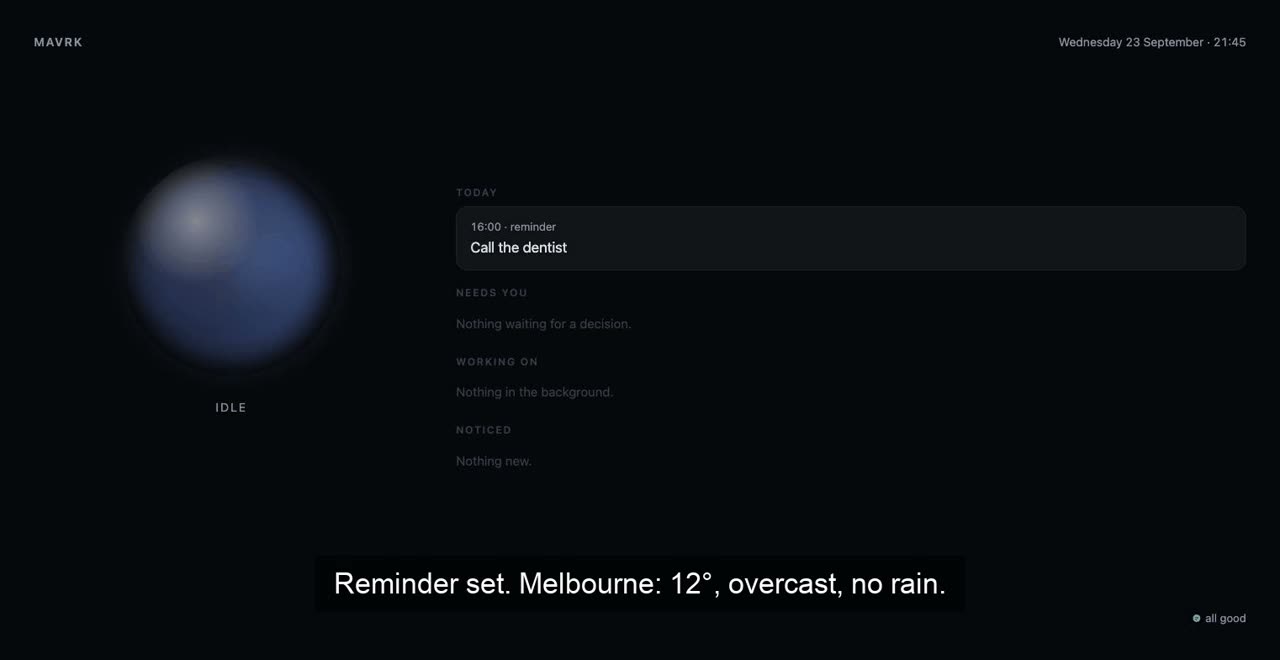
Fig. 6A real recording of the presence screen, 16 seconds with sound, made before the characters arrived (it shows the earlier orb). Asked Hey Mirrin, remind me to call the dentist at four, and what's the weather?, it puts the reminder on today's board and answers Reminder set. Melbourne: 12°, overcast, no rain. In this recording the orb stays in its resting colour.
4ApprovalsAvailable now
Section4
It asks first, and shows you a screenshot.
Everything your twin can do is marked read, write or dangerous. Reading happens on its own. Sending, booking, deleting, paying and running commands wait for your yes.
When it wants your yes for something on a website, the ask comes with a picture of the page, captioned “What Mirrin is about to submit”. Reply yes 12 or no 12 in the chat, or tap Approve on the presence screen. A plain “yes” works too, for the one thing it has just asked; if it isn't sure which you mean, it checks.
Every ask is in plain words. A payment reads “Pay 389.00 AUD for Jetstar MEL-SYD Tue 6am”, never code, with each detail on its own labelled line. Out loud, you can say yes to an everyday change, like sending a message; a dangerous one is never approved by voice, since anyone in the room could say it, so it goes to your phone and the screen instead.
TodayIn your chat
6:44
Mirrin
bot
The 5:10 cab from home to the airport is ready to book, $58. Reply “yes 12” or “no 12”.6:44 pm
rides.example/confirm
Confirm your ride
Pick-upThu, 5:10 am
RouteHome → Airport, T2
Total$58.00
Confirm booking
What Mirrin is about to submit6:44 pm
yes 126:45 pm
Booked, sir.6:45 pm
Message
TodayOn the presence screen
Needs you 1
Book the 5:10 cab to the airport, $58
Act on a websiteNeeds care#121 min agovia Telegram
DenyApprove
rides.example/confirm
Confirm your ride
RouteHome → Airport, T2
Total$58.00
Confirm booking
Tap to enlarge
Being tested
Tuesday 29 September
6:44
Mirrin needs a yes now
Book the 5:10 cab, $58
On your lock screen, sent by your own computer, with no server of ours in between. Tap it to see the picture and decide. Dangerous ones ask for a passkey: Face ID, a fingerprint or your device PIN.
Fig. 7One approval, three places to answer it. Illustrations, with the app's real wording. Lock-screen approvals come through a web app you add to your Home Screen (no app store). It's in the first release, and it is still being tested on real phones.
Money gets extra care: every payment needs your yes, whatever your settings say. Buttons that look like a payment (Pay, Buy, Checkout, Book now, Confirm booking, Subscribe, Transfer…) always come to you with a picture, even if you've told it to use the browser freely.
It also keeps track of what it spends, against two limits in your local currency (worked out from your time zone). Out of the box they are 100 a payment and 500 a month in dollars, pounds, euros or francs, and similar round amounts where the unit is worth far less: ¥10,000 and ¥50,000 in yen. Only you can raise them, on the Spending page (Spending… in the menu bar or tray), which shows this month's total and every payment it has made, and changes them on this computer only. Everything it does goes into a log you can read.
Level
For example
Out of the box
read
Reading a calendar, fetching a page
Automatic
write
Creating an event, sending an email
Asks first
dangerous
Running commands, deleting files, payments. Even a tool you've marked as always allowed asks for these.
Asks first
Fig. 8The three levels, and what each one covers.
5MemoryAvailable now
Section5
It remembers you. You can read every word.
Tell it once that you take the 7:40 train, or that your sister is called Priya, and it remembers. Every Sunday morning it writes a short portrait of you from what it knows.
Facts about health, money, relationships or secrets need your yes before it keeps them.
The Memory page shows all of it: the portrait, every fact, and what your twin has been doing. Forget anything that's wrong and add anything it missed. Forgetting is thorough: the fact goes from its logs and its daily copies too. Your own messages keep it until you clear the conversation with /forget.
It all lives in one file on your own computer, not in someone else's data centre. Once a day it checks that file and copies it, keeping the last seven.
127.0.0.1:7742/memory
Your twin
Who it is, and everything it knows about you.
How it sees you
An early riser who takes the 7:40 train, flies to Sydney most months and would rather be told than asked. Close to his sister, Priya.
Sunday, 08:00Refresh
Facts
commuteTakes the 7:40 train on weekdays.Forget
familySister is called Priya.Forget
travelUses the same cab firm for airport runs.Forget
generalSomething it should know, as a full sentenceRemember
Recent activity
approval.granted#12 browser_act
message.outNoted. Cab for 5:10 from home…
Fig. 9The Memory page, illustrated with its real labels.
6RoutinesAvailable now
Section6
It gets in touch first.
A fresh install comes with a morning briefing at 7:00: the shape of your day and anything waiting on a decision, sent to your chat. Move it, change it or delete it. If a routine can't run, it tells you why in plain words, once a day at most.
It keeps an eye on your calendar and inbox and gets in touch when something changes. Long jobs, like chasing a refund, run in the background on a board you can see. They pause when they need you and pick up again after a restart.
morning-briefing.yamlexcerpt · ships with it
name: morning briefing
…schedule:"0 7 * * *"prompt: |
Prepare the morning briefing. Check today's calendar and any reminders due today.
…
9:30 standup, then lunch with Priya at 1. Tomorrow: cab at 5:10, flight at 7.
One decision: your landlord wants to inspect on the 14th. Shall I say yes?7:00 am
yes, mornings only7:04 am
Drafted. Reply “yes 13” to send it.7:04 am
Message
Fig. 10An illustration. Sending the reply still asks first.
7OwnershipAvailable now
Section7
It outlives any company, ours included.
Personal AI tends to vanish when the company behind it is sold or shut down. Mirrin is built so that can't happen to yours.
If MavrkAI vanished tomorrow, your twin would carry on.
It never needed us. The only MavrkAI addresses your twin ever contacts are on GitHub: a pack from the community list that you choose to install or update, and our releases when you run mirrin update. It keeps its own copy of the list, built into each version. Once the list is signed, your twin will fetch the latest from GitHub when you search.
No account. You never sign up for anything to use it.
No server of ours. Your twin talks straight to your AI provider and your chat apps. There's no tracking or analytics of any kind.
Your files. Memory, portrait, personas and routines live in one folder on your computer, ~/.mirrin. mirrin identity export packs them into a single file you keep, with your keys and passwords left out.
Open source. The source is MIT: yours to read, change and fork. The default downloads include WhatsApp, whose code (libsignal) is GPL-3.0, so those downloads are GPL-3.0 as a whole. Every release also has an MIT build of the program without WhatsApp (it contains one MPL-2.0 library, yamux).
Any AI model. If your provider disappears, switch to another from the menu bar.
8SafetyAvailable now
Section8
Built to be handed the keys.
A twin with your email and a browser signed in as you has to earn that trust. Here is how Mirrin goes about it.
Nothing listens on the internet unless you say so.
Its control panel answers only your own computer until you turn on remote access, and every request needs a secret key. Your other devices connect over an encrypted link that ends on your computer, each with its own key you can revoke.
Changes wait for you.
Reading is automatic. Anything that changes something asks first, and shows you the whole command, script or message, never just the first line. Dangerous actions ask by default, even for a tool you've marked as always allowed.
Only you count as you.
On WhatsApp, that's your own chat. Email counts as yours only when your mail provider confirms it came from you, and on IRC only your registered account does, not a nickname anyone could borrow. If you let your twin answer other people, they never see your memory, and anything it would do for them waits for your yes.
Passwords and keys stay yours.
You can watch its browser live on the presence screen. When a site wants a login, a code or a CAPTCHA, your twin hands you the page and says what it needs: press Take over on this computer, do the part only you should, then Hand back, and it carries on where it left off. Other devices can watch, but taking over happens on this computer only. When you show it a task to learn, it never records what you type into a password field. Your API keys sit in files only you can read, and add-on tools it runs never see them.
Sensitive things ask first.
Remembering anything about health, money, relationships or secrets. Opening files that hold keys or passwords, like saved logins or SSH keys. Both ask by default, and those files always ask, as payments and commands do, whatever your settings say.
Everything is logged.
Type /audit in any chat, or read the log on the Memory page.
Our security thinking is public.
The threat model is published, with how to report a problem privately. Please try to break it.
Known issue: browsers share cookies between the web servers on one computer, so another web server on this computer that your browser visits (a local development server, say) receives the key your twin's pages use in that browser. Web pages can't use it against your twin, but a program behind that server could replay it, if it can't simply read your twin's own files; it never gets the master key.
This is early software, used every day by the person who wrote it. Read the threat model before you give it your inbox.
9PricingCloud: planned, not on sale
Section9
Free for good. Cloud, if you want it.
Free
Free, for good
$0
open source · no account
The whole twin, on your machine, for good.
The whole twin: voice that answers to its name, memory you can read, a signed-in browser, routines and personas
Eleven messaging channels (ten in the MIT build, which has no WhatsApp), plus voice and the terminal
Approvals with a picture of the page, spending limits, an audit log
Any model: Claude, OpenAI, Gemini, or one on your machine
Your twin exported to one file
The presence screen on your other devices, over Tailscale
Secure access from any network, through Tailscale, your own certificate or your own relay
Encrypted backup to a folder, iCloud Drive or any S3 bucket, locked with 12 words
Being tested on phones: a web app you add to your Home Screen (no app store), with a key for each device
Being tested on phones: lock-screen approvals, with a passkey (Face ID, a fingerprint or your device PIN) for the dangerous ones
It will rent you two things a server is actually good for: an address that reaches your machine from any network, and off-site space for encrypted backups.
It will never hold your twin, your keys or your memories.
Free is the longest list on purpose. Cloud is targeted to open in early 2027; to follow along, watch releases on GitHub or add their feed to a feed reader, with no account.
There is nothing to buy today.
10SetupmacOS · Linux · WindowsAvailable now
Section10
Install
What you need: on a Mac, the app; on Windows, the setup program; on Linux, or wherever you'd rather use a terminal, one line. And an AI model to think with: an account with Claude, OpenAI or Gemini (you pay them for what you use), or a free model on your own computer through Ollama.
On a Mac: the app
Download Mirrin-<version>-macos.dmg from Releases (one app for Apple silicon and Intel), drag the app into Applications and open it. It lives in the menu bar. The first time, a Welcome window finds or checks your model key, asks who you'd like your twin to be, and can restore a twin from an encrypted backup with your 12 words. Until the Mac builds are notarized by Apple, macOS blocks the app the first time you open it: choose System Settings → Privacy & Security → Open Anyway. The app doesn't start itself when you sign in: to have it do that, add it to the login items in System Settings → General.
On Windows: the setup program
Download Mirrin-<version>-windows-setup.exe from Releases. It installs for you alone, so it needs no administrator. It offers to run mirrin init when it finishes (paste your model key when it asks), and to start your twin in the system tray each time you sign in.
Anywhere: one line in a terminal
One line · macOS and Linux
$ curl -fsSL https://raw.githubusercontent.com/MavrkAI/Mirrin/main/install.sh | sh
Then, after the one line · macOS, Linux and Windows
# three questions, and your model key
mirrin init
# keep it running, and start it each time you sign in
mirrin service install
init asks who you are, which model to use and where to reach you. Paste your Claude, OpenAI or Gemini key when it asks, or pick Ollama and no key is needed. It checks the key works and keeps it on your computer. It pairs WhatsApp by QR code if you give it a number, then Mirrin has a first look around and introduces himself with something real he found. For the first week he suggests one thing a day; say “stop nudging” and he stops.
service install starts your twin straight away, and again each time you log in, and waits until it answers. If it doesn't come up, it tells you why in plain words. Keys you've exported in your shell go into ~/.mirrin/secrets.env, which only you can read, so the background twin has them too.
On a Mac, that's a background service with its icon in the menu bar. On Linux,service install runs your twin headless, with no app indicator, so there's no Channels… menu to click. Run mirrin tray instead of the service for the indicator, or keep the service and open the local Channels page with xdg-open "http://127.0.0.1:7742/channels?token=$(cat ~/.mirrin/data/api.token)" (if you haven't changed api.listen).
On Windows, it isn't a Windows service, which would run out of sight with no tray, microphone or browser window you can see. Instead it puts a small script in your own Startup folder that starts your twin in the system tray when you sign in, the same one the setup program writes, so it needs no administrator. mirrin service uninstall takes it out again.
To reach it from your phone, choose Channels… in the menu bar or tray. For the voice, run mirrin voice setup once (about 850 MB; on a Mac, first run brew install whisper-cpp sox uv).
Safe downloads: both installers check every download against the release's published checksums before installing anything, and try the new copy before replacing yours. If you have cosign, the Mac and Linux one also checks the Sigstore signature on that list. The Mac builds aren't notarized by Apple yet. If you'd rather read the installers first, they are install.sh and install.ps1. Or build from source with go install github.com/MavrkAI/Mirrin/cmd/mirrin@latest.
Ready-made builds: the Mac app as a disk image, Macs (Apple silicon and Intel), Linux and Windows (x86-64 and ARM64), and the Windows setup program for x86-64. The app, the setup program and the default programs include WhatsApp and are GPL-3.0; each program also comes as an MIT build without WhatsApp.
11PartsAvailable now
Section11
What's inside
Seven parts: one app, a brain you choose, hands, a heartbeat, a face, a character and routines you can share.
One app in your menu bar.
Mirrin is a single program running quietly in the background: in the menu bar on macOS, the system tray on Windows and the app indicator on Linux.
A brain you choose.
Claude by default, or OpenAI, Gemini, any OpenAI-compatible service, or a model on your own computer through Ollama. Switch from the menu bar. You bring the key and pay the provider directly.
Hands.
Its own Chrome window stays signed in to your sites and reads each page, so it can get things done on any website. Google Calendar, Gmail and Drive once you connect them. Add-on tools that run on your computer (MCP servers) plug in behind the same approvals. If no tool fits, it writes a small one you approve once. Show it a website task once and it can repeat it.
A heartbeat.
Reminders, scheduled routines, and an eye on your calendar and inbox. Long jobs sit on a board you can see.
A face.
The presence screen: your twin's character, what it heard, what it's doing and what needs you, with big Approve and Deny buttons, today as a timeline and the task board. After a minute of quiet it becomes a big clock. Keep it in a laptop tab or on a screen on the wall.
A character.
A persona: a name, a character, a way of talking, a voice and the name it answers to. Mirrin, the gentleman who's two steps ahead, is the default; Nyra and Pickoo come with him. Yours can be anyone.
Routines you can share.
Protocols are short routines that run on a schedule or when you ask (“run the morning briefing”). They're shared in packs that anyone can publish.
Fig. 11The states, each in the colour the presence screen uses (its dark theme). On the screen the character wears them: the pin on Mirrin's dinner jacket, the sparkle clip in Nyra's hair, and the bow tie on the penguin (Pickoo and any persona without a drawing of its own). Amber is kept for what needs you.
Your twin runs on your machine, so it costs us nothing when you use it. We run no server for it, so there's nothing to charge for. Its source is MIT licensed (the default downloads, which include WhatsApp, are GPL-3.0, and an MIT build comes without it), it needs no account, and nothing it does today will move behind a paywall. The planned Cloud will charge only for what genuinely needs a server of ours: an address and off-site storage. If you'd like to fund the free version, we intend the planned Supporter plan for exactly that.
What happens if MavrkAI disappears?
Your twin keeps working, because it never needed us. There's no account and no server of ours in the loop, and the source is MIT on GitHub for anyone to fork. The only MavrkAI addresses your twin ever contacts are on GitHub: a pack from the community list that you choose to install or update, and our releases when you run mirrin update. Search already uses the copy of the list built into your twin, so it would carry on; packs from that list couldn't be installed or updated until you point your twin at another list in its settings. The routines you already have would keep running.
We've designed Cloud to fail gently too. The pledge is 90 days' notice and backups that stay downloadable. Backups would be in a standard encrypted format (age) that your 12 words unlock without us, and the relay is open source so you can run your own. A Cloud pass will be checked on your computer and last up to 35 days, so even a sudden outage on our side would give you weeks.
Do you see my data?
On the free version there is nothing for us to see. We run no server, and there's no tracking of any kind. Your AI provider sees what you send it. Choose Ollama and the model runs on your machine too, so your conversations never leave it, beyond the chat app you have them in. The screen's weather still asks Open-Meteo, with your time zone's city, unless you set ui.weather: false.
With the planned Cloud we would see connection details: your address, when your machine connects, your home IP, the rough network your phone connects from, bytes and duration, and backup sizes and times. We could not see inside the connection: messages, screens, approvals, memory, voice. The full list, with a command to check each line, is on the pricing page.
Can I self-host the relay?
Yes. The relay is in the first release, as its own program and container. Run it on a small server, point your twin at it with mirrin reach use relay, use your own domain, and MavrkAI isn't involved at all. If you use Tailscale, the presence screen and chat already work over it, and a secure address over Tailscale (mirrin reach use tailscale) is in the same release.
What will the model cost me?
That's between you and your provider: you pay them on your own key, for what you use. Your twin estimates it from list prices (mirrin usage shows today, this month and the last week) and warns you at 80% of a monthly budget and again when it's passed: US$25 out of the box, which you change with usage.monthly_budget. The warning comes as a notice on your desktop, on its Health page and in mirrin doctor. Choose Ollama and the model costs nothing.
Which models does it use?
You choose, and you can switch from the menu bar: Claude (the default), OpenAI, Google Gemini, any OpenAI-compatible service, or a local model through Ollama. You bring your own key and pay the provider directly. We don't resell tokens, and Cloud would never touch your model calls. A fair warning: small local models are private, but they make more mistakes with tools than the big hosted ones.
Does it work without the internet?
The core does. With Ollama, the AI model, memory, listening and voice all run on your computer. You'll need a connection once to download the voice models (about 850 MB) and your Ollama model. Anything that is the internet by nature needs a connection: the chat apps, web browsing, email, Google and the weather.
Does it run on Windows and Linux?
Yes, the same program runs on all three: as a background service with a menu bar icon on a Mac, as a background service on Linux (mirrin tray adds an app indicator), and in the system tray on Windows, started when you sign in, with no administrator needed. macOS is the most polished: it has the floating character, and iMessage is Mac-only. On Windows, for voice you'll install whisper.cpp and sox yourself for now. There are ready-made builds for Macs with Apple silicon or Intel, and for Linux and Windows on x86-64 and ARM64.